School Mode in MichalKids — How It Works and Why It's Free
The Problem: Phone Ban Law and Chaos
Since 1 September 2026, a statutory ban on students' use of phones and other devices allowing remote communication or recording images and sound applies in Polish primary schools (Act of 3 July 2026, Journal of Laws 2026, item 1036). The ban has exceptions – e.g. a teacher's consent or health reasons – and the details, including rules on school trips and any places to store phones, are set in the school's statute. Secondary schools set their own conditions or a ban in their statutes.
Schools are reacting inconsistently:
- Some collect phones into lockers (costs, liability)
- Others ban bringing phones entirely (but what about safety on the way?)
- Still others are only now adapting their statutes to the new law
Parents are stuck:
- I want my child to have a phone for the commute — they walk independently
- I don't want them using it during lessons — I agree with the school
- I don't want the school to be responsible for the phone — it could get stolen from a locker
Solution: School Mode in MichalKids
The phone stays with the child. But it automatically locks when the child enters school. And automatically unlocks when they leave.
How Does It Work Technically?
1. Geofence — Virtual Fence
The parent draws a zone around the school in MichalKids app (or selects from a school directory). This is a geofence — a virtual zone defined on the map.
When the child's phone detects it's INSIDE this zone — it activates School Mode.
2. Lock Task Mode (Android)
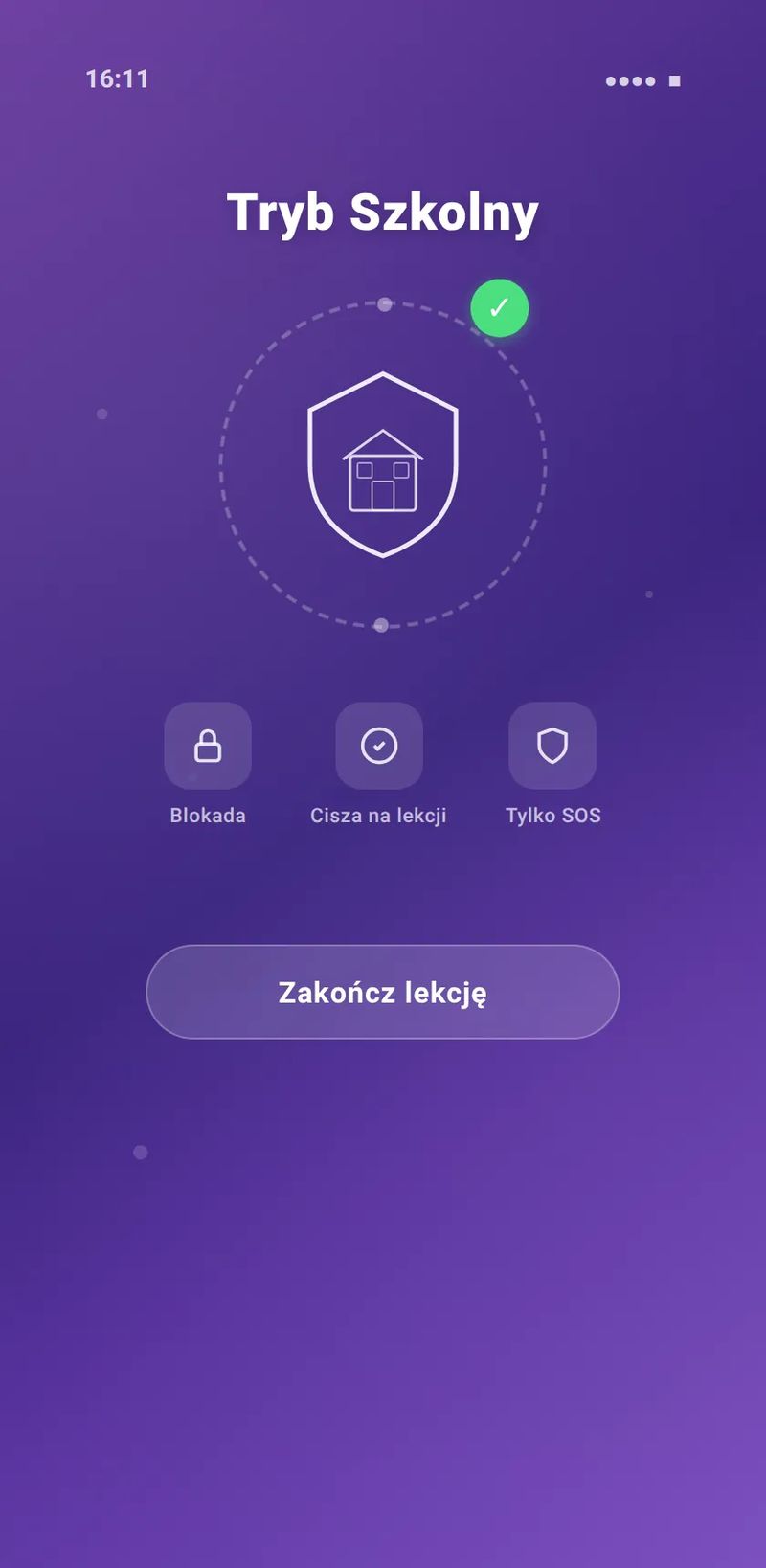
On Android, MichalKids uses Lock Task Mode — Android's official API for kiosk-type apps. The phone:
- Locks the home screen — child can't open any app
- Displays School Mode screen — calm, readable message: "School Mode active"
- SOS is ALWAYS available — one button, one action: call parent
Lock Task Mode isn't a "root hack" — it's official Android API used by schools, corporations, and institutions.
3. AI Auto-Detection of Schedule
Instead of manually entering when the child is at school, MichalKids analyzes patterns:
- When is the child regularly in the school zone?
- At what hours?
- On which days?
Based on this, AI suggests a schedule: "Child is at school Mon-Fri 7:30-2:00 PM. Want to activate School Mode during these hours?"
The parent confirms or modifies. AI doesn't activate anything on its own.
4. Age-Themed UI
The School Mode screen looks different depending on the child's age:
- 6-9 (Kids): colorful, friendly icons, simple message
- 10-12 (Tween): calmer, more "mature" design
- 13-15 (Teen): minimalist, dark theme
- 16-18 (Mature): discreet, no childish elements
The child doesn't feel infantilized. School Mode looks "cool" — not like punishment.
5. SOS — Always Available
Regardless of School Mode:
- SOS button visible on screen — one click
- Calling parent — always possible
- CHECK_IN — child can send location to parent ("I'm OK")
If the child uses SOS, School Mode automatically suspends for 5 minutes so the child can freely use the phone in an emergency.
Setup — 5 Steps
Step 1: Install MichalKids on the child's phone
Download from Google Play / App Store. Connect to parent's account (QR code).
Step 2: Add "School" zone
In parent's app: Safe Zones → Add New → Search school by name or draw on map.
Step 3: Enable School Mode for the zone
Toggle "School Mode" on the school zone. Done.
Step 4: Set schedule (optional)
If you want School Mode only during school hours (not weekends, not holidays) — add a schedule. Or wait for AI's suggestion.
Step 5: Test with the child
Enter the school zone together and check:
- Does School Mode activate?
- Does SOS work?
- Does the child know what to do if they need help?
Why Free?
School Mode in MichalKids is free, forever. Even in the free plan (FREE tier).
Why?
1. School safety is a basic need, not a luxury
Making parents pay for a feature that helps them follow the law would be unfair. School Mode addresses a real need for Polish families and should be available to everyone.
2. A family business, a family perspective
MichalKids is a family company — we are parents ourselves. This problem is personal to us. School Mode was built because we needed it ourselves.
3. Ready for the new rules
The phone ban in Polish primary schools is already in force, and every school needs a solution. MichalKids is ready — with School Mode that works with the law, not against it.
Teacher Panel (planned)
Coming Soon
For Q3-Q4 2026 we're planning a Teacher Panel:
- Teacher sees which children have School Mode active
- Can request parents to activate (not force!)
- Class statistics (what % of students use School Mode)
- Zero access to child's personal data — only ON/OFF status
This is a collaboration tool between parents and school — not surveillance.
FAQ
"Can the child disable School Mode?"
No. Lock Task Mode requires parent's PIN to deactivate. The child can't bypass it without physical access to the parent's phone.
"Does it work on iPhone?"
Yes, but with iOS limitations (Screen Time + Guided Access). Full implementation on Android.
"What if the school has no WiFi/signal?"
Geofence works on GPS — doesn't require internet for activation. The zone is saved locally on the phone.
"Is it GDPR compliant?"
Yes. We process location data in accordance with GDPR. Who the data controller is, to whom and for what purpose we transfer data, and how long we keep it, is described in our privacy policy.
"What about holidays/vacation?"
The schedule automatically disables School Mode outside school days. You can also toggle manually.
Guardian, not a spy. School Mode is a safety tool — not punishment for having a phone.
Sources:
- Act of 3 July 2026 amending the Education Law (Journal of Laws 2026, item 1036) (in Polish) — Art. 98a–98d: ban on phone use in primary schools from 1.09.2026, exceptions, statute, storage
- Android Developers — Lock task mode — kiosk mode: locking a device to selected apps
- MichalKids privacy policy — data controller, purposes and recipients