
Parental Control Apps 2026 — Ranking. Which One Actually Protects?
What Should a Good Parental App Have?
Before we start comparing, let's establish criteria. A good parental app isn't the one that blocks the most — it's the one that helps the child learn to manage technology independently.
Evaluation Criteria:
- Location — does the parent know where the child is (safe zones, routes)
- Screen time — screen budget management (in MichalKids: in preparation)
- Content filtering — protection from inappropriate content
- Education — does the app teach the child, or just block
- Transparency — does the child know what's collected and why
- School mode — does it help follow the ban on phone use in Polish primary schools, in force since 1 September 2026
- Privacy — is data safe, or sold to third parties
- Price — financial accessibility for families
Comparison: 7 Apps
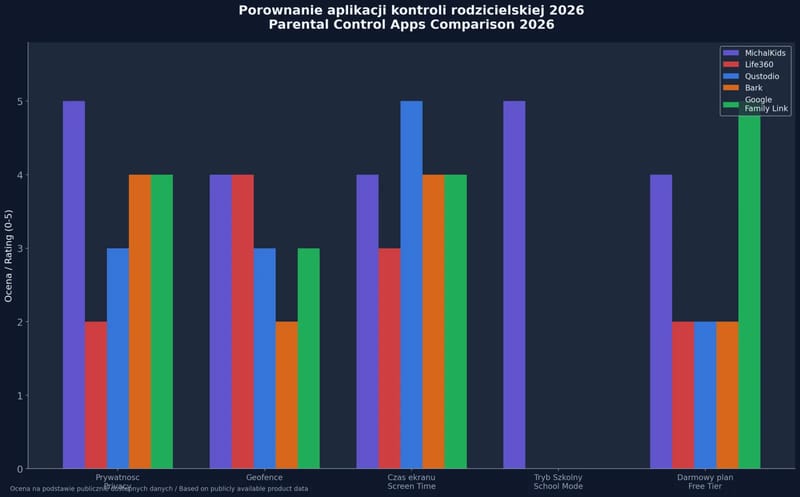
We describe other apps' features based on the producers' websites (as of 24.10.2026, links in the sources). "Not listed" means we did not find the feature on the producer's website – offers change, so check the current information before choosing.
| Feature | Google Family Link | Bark | Life360 | SafeKiddo | Beniamin | Kaspersky Safe Kids | MichalKids |
|---|---|---|---|---|---|---|---|
| Location | Location + arrival and departure notifications for places | Location sharing | Advanced (history, place alerts) | Location + zones (geofencing) | Not listed | GPS + location alerts | Advanced (snap-to-road, zones, routes) |
| Screen time | Limits + schedules | Screen time management | Not listed | Time limits | Time limits for games and apps | Time limits | Screen budget + AI goals (in preparation) |
| Filtering | Basic | Content and communication monitoring | Not listed | Advanced | Website filtering, YouTube control | Website and YouTube filtering | No content filtering |
| Child education | None | None | None | None | Limited | None | Academy (courses, certificates, quizzes) – in preparation |
| Transparency | Medium | Low (communication monitoring) | Low | Medium | Low (view of the child's screen) | Medium | Full (child sees same data) |
| School mode | YES ("School time" – schedule) | Not listed | Not listed | Not listed | Not listed | Not listed | YES (geofence + Lock Task, free) |
| Privacy | Google (data collected) | Reads child's messages | Sold location data (exposed in 2021) | OK | Screenshots and live view of the child's screen | Russian producer – BSI warning (2022) | Zero data selling, EU hosting |
| Price | Free | Paid subscription (US offer) | Free version + paid plans (e.g. Gold €9.99/month) | See producer's price list | See producer's price list | See producer's price list | School Mode free, Premium from $5/month |
The "Child education" and "Transparency" rows are our assessment, not producer data.
Detailed Analysis
Google Family Link
Pros: Free, well integrated with Android, easy setup, a "School time" schedule that limits the phone to selected apps during lessons. Cons: No routes and no educational component, and school mode follows a schedule rather than whether the child is actually at school. The child feels "surveilled" because they see blocks but don't understand why. Data collected by Google.
For whom: Parents who want "something" but don't want to pay. Minimum protection.
Bark
Pros: AI analyzes messages and posts for threats (cyberbullying, depression, sexting); it also offers location sharing and screen time management. Cons: Reads the child's messages. This is a fundamental problem — the child loses privacy, and the parent gets alerts that may be false positives. Would you want someone reading YOUR messages "for your own good"? Your child doesn't want that either. Not available in Polish.
For whom: Parents very concerned about content, willing to invade the child's privacy.
Life360
Pros: Extensive location features, "bubbles" marking arrival at home/school. Cons: Sold users' location data to about a dozen data brokers – exposed by The Markup in December 2021. In January 2022 the company announced it would phase out most of these deals, except with two partners (Arity and Placer.ai). Full features are in paid plans.
For whom: Parents focused solely on location.
SafeKiddo
Pros: Polish product, good content filtering, time limits, location with zones and an emergency button. Cons: We did not find a school mode or an educational component for the child on the producer's website. "Block and control" approach.
For whom: Parents of younger children (6-10) who primarily want content filtering.
Beniamin
Pros: Polish, works on Windows computers and Android phones, filters inappropriate websites, time limits for games and apps. Cons: The parent can view the child's screen in real time and receives screenshots from social media – closer to surveillance than conversation. We did not find location or a school mode on the producer's website.
For whom: Parents who mainly want website filtering on a computer and an Android phone.
Kaspersky Safe Kids
Pros: Feature-rich — location + filtering + screen time. Cons: Russian producer — in March 2022 Germany's Federal Office for Information Security (BSI) warned against Kaspersky antivirus software and recommended replacing it with other products. No educational component.
For whom: Parents looking for all-in-one, if they have no geopolitical concerns.
MichalKids
Pros: Polish, education-first, child sees the same data as parent, free school mode that switches on when the child enters the school zone, snap-to-road routes, zero data selling; in preparation: Academy (courses, certificates), AI Coach. Cons: Young product (beta), no content filtering (conscious decision — we teach recognition, not blocking), smaller user base.
For whom: Parents who want to educate their child, not just control. Parents aware that blocking is a temporary solution.
Why Blocking Isn't Enough
Every app based solely on blocking has the same problem: the child will eventually find a workaround or will turn 18 with zero digital skills.
Blocking is like locking a child in the house so they don't go outside. Instead — teach them to cross the street.
The MichalKids Philosophy
Our philosophy rests on three pillars:
1. Education, Not Control
Academy with courses, quizzes and certificates (in preparation). The child will learn there to recognize phishing, deepfakes, cyberbullying. Knowledge stays for life — a block disappears when the app is uninstalled.
2. Transparency, Not Surveillance
The child sees the same data as the parent. Shared goals, shared limits. Dialogue instead of behind-the-back control.
3. Free School Mode
We offer School Mode — automatic phone lock at school (geofence), SOS always available — for free. Because this shouldn't be behind a paywall. Since 1 September 2026 a statutory ban on phone use applies in Polish primary schools (Journal of Laws 2026, item 1036) — parents and schools need a simple way to follow it.
Guardian, not a spy. We don't block the internet — we teach how to use it.
Sources:
- The Markup — The Popular Family Safety App Life360 Is Selling Precise Location Data on Its Tens of Millions of Users (6.12.2021) — sale of location data to about a dozen data brokers
- The Markup — Life360 Says It Will Stop Selling Precise Location Data (27.01.2022) — announced phase-out of deals except Arity and Placer.ai
- German Federal Government — Warnung des BSI zur Virenschutzsoftware Kaspersky (15.03.2022) (in German) — BSI warning against Kaspersky antivirus and recommendation to replace it
- Act of 3 July 2026 amending the Education Law (Journal of Laws 2026, item 1036) (in Polish) — ban on phone use in primary schools from 1.09.2026
- Google For Families Help — Set up a schedule on your child's device — "School time" in Family Link
- Google Family Link — location, place notifications, time limits, schedules
- Bark — Products & Pricing — content monitoring, screen time management, location sharing, Bark Premium subscription
- Life360 — plans (EU) — free plan and paid plans (Silver, Gold)
- SafeKiddo — filtering, time limits, location and geofencing, emergency button
- Beniamin (in Polish) — Windows and Android, live view of the child's screen, social media screenshots, website filtering, time limits
- Kaspersky Safe Kids — GPS and location alerts, website and YouTube filtering, time limits