
GPS for Kids — App, Smartwatch, or Tag? Comparison 2026
Three Options for Locating Your Child
When a child starts walking to school, to the playground, or to a friend's house alone — the question naturally arises: how do I know where they are? There are three categories of solutions on the market:
- Phone app — software installed on the child's smartphone
- GPS smartwatch — a watch with a SIM card and location tracker
- GPS tag/keychain — a tiny device without a screen
Each solution has pros and cons. Key point: there's no single "best" — there's "best for your child and their age."
Comparison
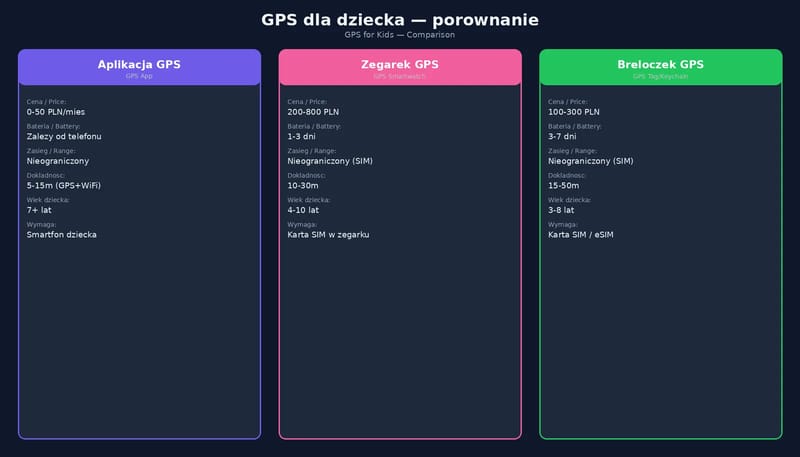
| Criteria | App (MichalKids) | GPS Smartwatch | Tag (e.g., MichalTag) |
|---|---|---|---|
| Child's age | From 6-7 (requires smartphone) | From 4 years | From 3 years |
| One-time cost | $0 (free app) | Watch purchase (depends on model) | Tracker purchase (depends on model) |
| Monthly cost | $0-8/month (tier) | SIM card (operator plan) | Data transmission, e.g. eSIM/LTE-M — a low-power network for IoT (depends on model) |
| Battery | Depends on phone | Depends on model | Depends on model |
| Screen | Yes (phone) | Yes (small) | None |
| School phone ban | Phone is covered by the ban – School Mode (lock) | A watch with calling is covered like a phone | Depends on features – ask the school |
| Distraction | Yes (games, social media) | Limited | Zero |
| GPS accuracy | Typically within about 5 m under open sky, worse near buildings | Depends on model | Depends on model |
| Extra features | routes, zones; AI Coach and Academy in preparation | Calling, SOS | SOS (button), geofence |
| Waterproof | Depends on phone | IP67/IP68 | IP67 |
Option 1: Smartphone App
For whom?
Children from 6-7 who already have a smartphone (or you're planning to get one).
Pros:
- Multifunctionality — location is just one of many features
- Education — courses, quizzes and AI Coach (in MichalKids: in preparation)
- Communication — child can call, text
- OTA updates — new features without buying a new device
- School mode — automatic phone lock at school
Cons:
- Child needs a smartphone — cost, distraction risk
- Battery — intensive use = dead phone by midday
- Addiction — phone means TikTok, YouTube, games. Location is 1% of phone functionality
MichalKids as an app:
- Safe zones with notifications (enter/exit)
- Snap-to-road routes (along streets, not straight lines)
- Auto-discovery (AI suggests new zones based on habits)
- AI Coach with weekly reports (in preparation)
- Safety corridor on routes (deviation alerts)
Option 2: GPS Smartwatch
For whom?
Children 4-8 years, too young for a smartphone, but already walking independently.
Pros:
- Simplicity — child puts on the watch and forgets
- Calling — some models allow voice calls
- SOS — emergency button
- Not distracting — limited features = no TikTok
Cons:
- Battery — many models need frequent charging, check battery life before buying
- Accuracy — depends on the quality of the receiver and antenna in a given model
- SIM card — additional monthly cost
- Child can take it off/lose it
- School ban — since 1 September 2026, Polish primary schools ban the use of phones and other devices that allow remote communication or recording images and sound, so a watch with calling is covered just like a phone
- No updates — hardware ages fast, replacement after 1-2 years
- Data security — with cheap watches from unknown manufacturers it is hard to check how they protect the child's data
Watch out:
In 2017 the Norwegian Consumer Council (Forbrukerrådet) tested several GPS watches for children and found serious security flaws — in a few simple steps a stranger could take control of the watch, track the child, eavesdrop on and communicate with them, or make the location show a different place. Alerts for leaving a zone and the SOS function were also unreliable. Choose verified brands.
Option 3: GPS Tag/Keychain
For whom?
Children from 3 years. Any child who doesn't need a screen.
Pros:
- No screen = zero distraction — child doesn't play or scroll
- Battery — without a screen it usually lasts longer than a watch
- Small and light — attach to backpack, jacket, belt
- Less trouble at school — the law does not mention screens, only devices for remote communication or recording images and sound; whether a given tracker (e.g. with an SOS button) counts depends on its features, so ask the school. Such devices may not even be brought into preschool
- Durable — child can get it wet, drop it, wear it in rain
- SOS button — one long press = alert to parent
- Privacy — location goes to parent, not to a corporation
Cons:
- No communication — child can't call or text
- Limited features — only location + SOS + geofence
- Requires pairing with parent's app
MichalTag (planned Q4 2026):
Coming Soon
MichalTag is a GPS keychain designed by MichalKids:
- LTE-M / NB-IoT — indoor coverage, low power
- eSIM — no physical SIM card, lower costs
- 7-14 day battery — USB-C charging
- SOS button — notifies parent immediately
- Geofence — alert when child leaves safe zone
- MichalKids integration — same zones and routes (AI Coach in preparation)
- No screen — zero distraction
Which Solution for Which Child?
Ages 3-5: Tag
A child this age doesn't need a screen. A tag attached to a jacket or backpack gives the parent peace of mind and the child — freedom. Just remember that since 1 September 2026 devices allowing remote communication or recording images and sound may not be brought into Polish preschools – agree with the preschool whether the tracker can stay in the cloakroom.
Ages 6-9: Tag + (optionally) phone app
If the child doesn't have a smartphone yet — tag. If they do (e.g., parent's old phone) — app with School Mode.
Ages 10-13: Smartphone app
The child probably already has a phone. MichalKids with School Mode and routes is the optimal solution (AI Coach is in preparation).
Ages 14-17: App (light touch)
A teenager needs privacy. MichalKids allows shared goals and transparency — the child sees what the parent sees. No "secret GPS." Where to draw the line, we write in the article on teen privacy.
Important: Tell Your Child You're Using Location
Regardless of the solution chosen — the child should know. Secret location tracking destroys trust. More about this conversation in how to tell your child that you can see their location. Say:
"We have this app/tag so we know you're safe. You can see the same information. As you grow older, we'll gradually turn it off — because you'll learn to take care of yourself."
Guardian, not a spy. Location is a safety tool, not a control tool.
Sources:
- Forbrukerrådet (Norwegian Consumer Council) — Significant security flaws in smartwatches for children (18.10.2017) — flaws in children's GPS watches: takeover, tracking, eavesdropping, fake location, unreliable SOS and zone alerts
- Act of 3 July 2026 amending the Education Law (Journal of Laws 2026, item 1036) (in Polish) — Art. 98a: ban on using phones and other devices allowing remote communication or recording images or sound in primary schools; Art. 102a: ban on bringing such devices into preschools; from 1.09.2026
- GPS.gov — GPS Accuracy — GPS smartphones: typically within 4.9 m under open sky, worse near buildings, bridges and trees; accuracy also depends on receiver quality
- GSMA — Long Term Evolution for Machines: LTE-M — LTE-M is a low-power IoT technology with extended coverage