You know where your child is.
They know what you see.
Your child's location, zones with alerts and SOS. Your child has their own app and sees the same data about themselves that you do.
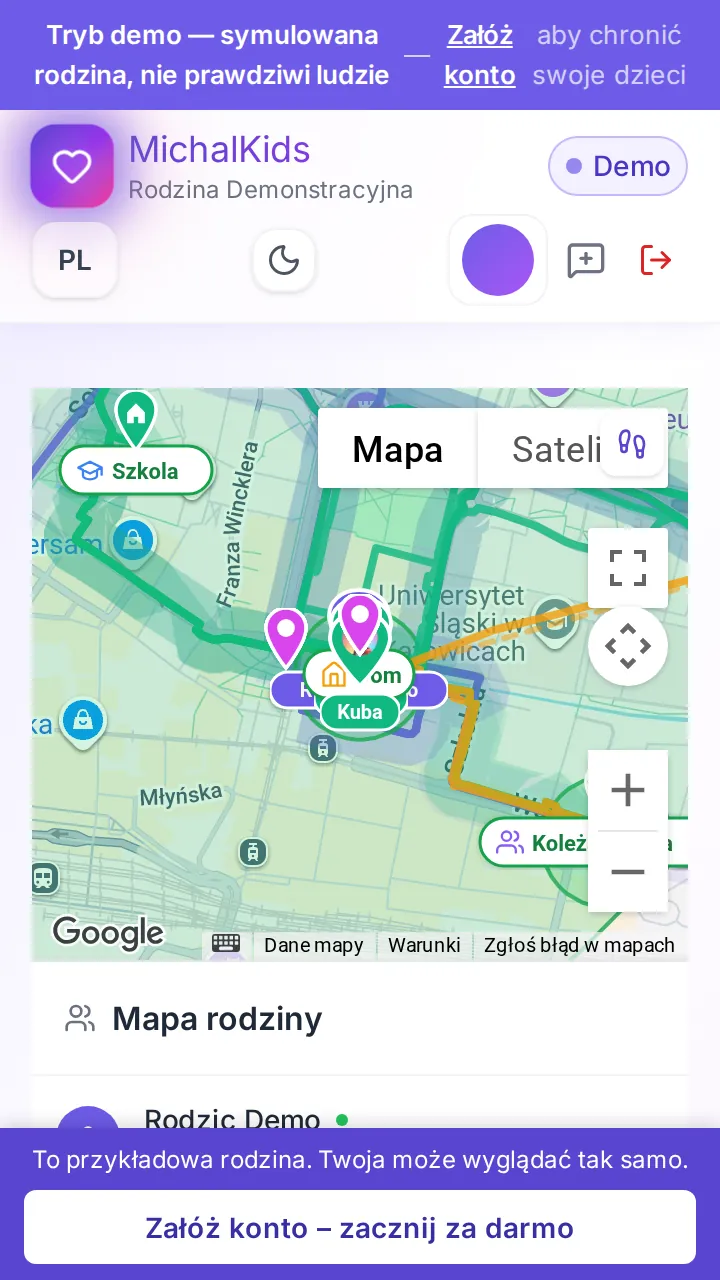
 This is the parent dashboard. Tap to open the demo.
Free plan forever, no card and no hidden fees. 30 days of Premium free, then Free or a paid plan from Free plan: 1 child, location every 30 minutes, 2 zones and SOS. Paid plans from 14,99 zł/mo or 129,99 zł/year
Location active
GPS • High accuracy
Position from the child's phone
SOS Alert
Instant
With the child's location
See how it actually works
Not a screenshot. This is the parent dashboard with a simulated demo family, on live data.
Create an account – start free
The preview is read-only. The data comes from a simulated demo family, not from real users.
Location for one outing. With your child’s consent.
You send your child a link for practice, a trip or the way home. Your child opens it in the browser, with nothing to install, reads what you will and will not see – and decides.
- Nothing to install – a plain link in the browser on your child’s phone.
- Consent first – your child can agree or decline. Declining starts nothing.
- Only during the outing and only while the Pakt page is open – an approximate place (about 100 m), no route history. Your child can turn Warta off at any time.
No app or account on your child’s phone, no constant location. Pakt works from a single link – and only for one outing your child agreed to.
Your child sees the same data as you.
See how Pakt works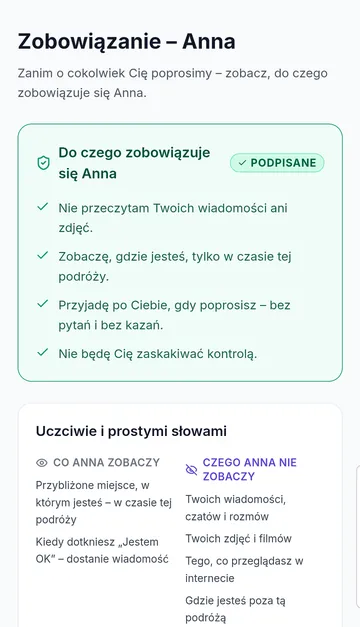
Simple pricing for every family
Start free. Upgrade when you want more insight and peace of mind.
You will be charged in Polish złoty (zł); your bank will convert the amount.
Start freeCreate a free account
- Family location
- 1 child
- Location every 30 minutes (live during an SOS)
- 2 safety zones
- SOS alerts
- Battery notifications
Annual payment: 129,99 zł/year
Choose Standard- Everything in Free
- Up to 3 children
- Location every 5 minutes
- 5 safety zones
- Location history
- Route plans
- Routine analysis
Annual payment: 249,99 zł/year
First 30 days of Premium free, no card required
First 30 days of Premium free, no card. Then your account switches to Free by itself – you pay only if you choose a plan.
Choose Premium- Everything in Standard
- AI insights about your child
- Unlimited children
- Unlimited safety zones
- Full routine analysis
- Priority support
Everything you need
Simple, secure and always available tools for your family's peace of mind
Simple tools for your family's peace of mind
School Mode (FREE)
Turns itself on in the school zone and covers the phone with a full screen. SOS stays available. It is not a lock a child cannot leave.
SOS by a tap, or by the fall itself
SOS by button or when the phone is dropped
Your child taps — you get an alert with location right away. And if the phone slips out of their hand, the alarm starts on its own: the phone recognises the fall, gives your child a moment to cancel, and only then tells you.
Your child holds the SOS button – you get an alert with the location. If the phone falls out of their hand, the app recognises the drop, gives your child a moment to cancel and only then notifies you.
Safe Zones
Know your child arrived at school, grandma's, the pool. Entry/exit alerts. Routes with 200m corridor.
Games & Challenges
Badges for outdoor activity. Family leaderboards. Road safety games. 4 age-themed modes.
Transparency
Your child sees the same data as you. Zero keylogger, zero screenshots.
Convinced?
Create a free accountA family building for families
We built MichalKids because we are parents ourselves. We were looking for an app that protects children without spying on them. We couldn't find one. So we built it as a family.
The name comes from Archangel Michael — a guardian and defender.
Dad – Jakub Pazdyga, an educator (education degree specialising in IT education) with more than 20 years of experience in IT – writes the code. Mom creates content and runs campaigns. The older children design graphics and educational games. The youngest are the toughest testers – if a preschooler can't press the SOS button, the button is badly designed.
How does it work?
Three simple steps to family peace of mind

Create account
Sign up for free in seconds

Pair devices
Install the app on your child's phone

Care & protect
Stay up to date with location and safety
Family Dashboard
Location, battery, activity and safety of all your children on one screen. Real-time updates.
Learning through play
Outdoor challenges, activity badges and healthy habits. Motivational system adapted to your child's age.
Wellbeing 6D
Multidimensional wellbeing assessment: sleep, movement, screen time, social contacts, routine and safety.
Poradniki dla rodziców
- Numer alarmowy 112: Czego nauczyć dziecko i kiedy naprawdę dzwonić
- Dziecko nie odbiera telefonu — co zrobić, zanim wpadniesz w panikę
- Jak rozmawiać z dzieckiem o bezpieczeństwie w internecie? 10 zasad
- Ile czasu ekranowego dla dziecka? Praktyczne granice według wieku
- Komputer w pokoju dziecka: co widać, a czego nie
- Obóz i kolonie: co ma sens, gdy telefon bywa schowany